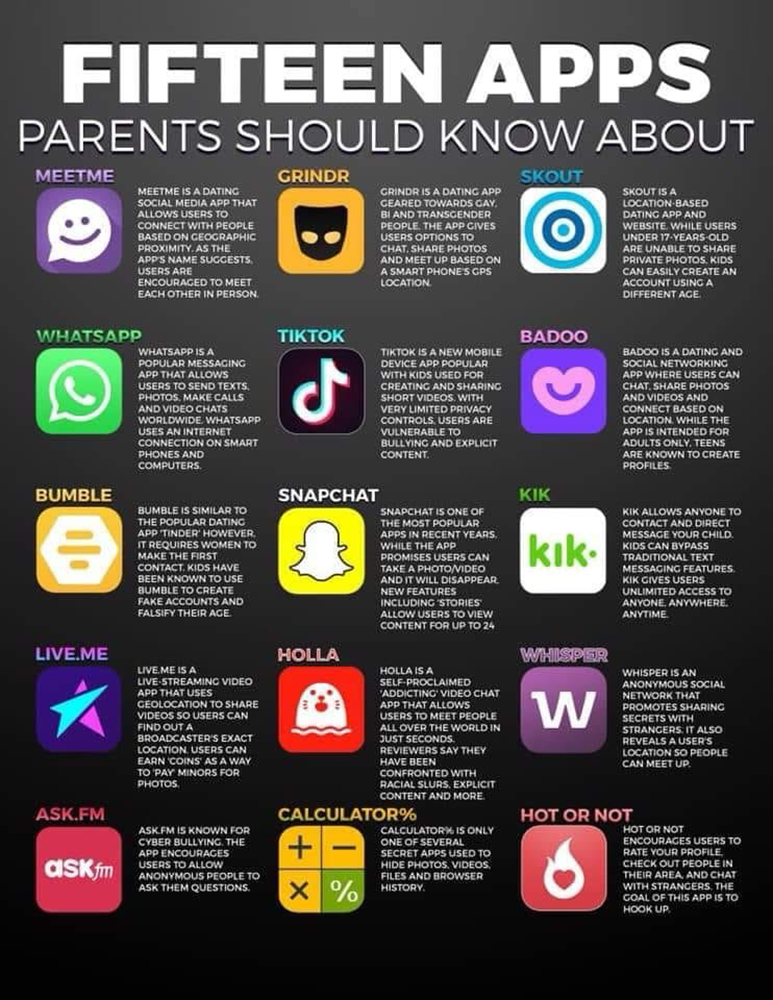
In an ever-changing digital landscape, it is essential that our young people know how to stay safe and harness the positives offered by the online world, whilst being aware of the pitfalls and problems it can create. Used correctly, digital media offers young people the opportunity to explore, connect, create, and learn and, as a school, we believe in the importance of teaching young people about these opportunities as well as safeguarding them against the problems of misuse.
As a school, we share advice and guidance with our school community, highlighting both the positive and negative aspects associated with living in the modern, digital world. Through our curriculum, we explore the consequences of our actions and the ramifications associated with: cyberbullying, digital cheating, identity, self-image, digital footprint, communication and internet safety. We understand that it is essential for all to have the necessary skills to be able to manage the online world.
The government has recently announced new measures to keep children safe online. At Breckland School we have appropriate filters and monitoring systems in place, so that no student can access harmful content via the School IT systems and concerns can be spotted quickly. We also teach our students about safeguarding, including online, through our PSHE and Tutor Time programmes.
Please see below for links to some great online resources for families about online safety. They provide helpful support and information on understanding the risks and benefits of social media and advice on how to prevent risks becoming problems.
For example the UK’s Council for Child Internet Safety (UKCISS) has produced a new guide for parents on social media. It contains practical tips about the use of safety and privacy features on apps, cloud services and games, and some conversation prompts to help families start talking about online safety.
- https://www.thinkuknow.co.uk/parents – information for concerns over children and where to report incidents
- http://www.internetmatters.org – expert information on how to keep your children safe online
- Child Safety Online Information – Government guidelines on using Social Media
- Online Safety – NSPCC online safety information
Information for internet use at home:
- Be aware of what is on the internet and what your child could be exposed to – not just inappropriate content but scam and ‘phishing’ sites
- Ironically, don’t give your child a list of do’s and don’ts – they’ll probably ask ‘why not’ and then try to find out! Children are more likely to respond more positively if you encourage them to be ‘smart’ or ‘cool’ on the Internet
- Set rules for use – including what to go on and the length of time – over 10 hours per day are spent online for teenagers
- Don’t forget, it’s not just computers, mobiles phones and tablets have more and more internet facilities on them.
- Keep your machine safe with anti-virus software
- Consider parental controls to restrict/monitor internet access
- Don’t be afraid of confrontation if you find any wrong-doing – but don’t overreact. Sometimes it is just an innocent mistake.
National Online Safety
Parents/Carers wishing to access the Online Safety Course and Resource Hub from National Online Safety should click here.

The RHC button is an asset of SWGfL, a charity working internationally to ensure all benefit from technology, free from harm.
The button has been developed to offer anyone living in the UK a simple and convenient mechanism for gaining access to reporting routes for commonly used social networking sites, gaming platforms, apps and streaming services alongside trusted online safety advice, help and support.
It also provides access to an online mechanism for reporting online harm to the RHC service for those over the age of 13 where an intial report has been made to industry but no action has been taken. RHC will review content in line with a sites’ community standards and act in a mediatory capacity where content goes against these.
Children under 13 years of age are encouraged to tell an adult that they trust about what has happened and to ask for their help in reporting this going through our how we can help resource together.
RHC also have advice and links to reporting routes for other online harms people may come across or face, such as impersonation, privacy violations and intimate image abuse.
The RHC button provides a gateway to the RHC reporting pages, an area of the RHC website offering:
- links to reporting routes on commonly used sites for eight types of online harm
- help, advice and support on what to do if experiencing or witnessing harm online
- signposting to industry partners reporting forms and the ability to report legal but harmful content directly to RHC for further investigation.
Reporting to RHC
Reports can be made 24/7 through the online reporting forms and helpline practitioners will review and respond to reports within 72 hours between 10am and 4pm Monday to Friday.
Reports can be made to RHC by anyone over the age of 13. SWGfL operates 3 helplines and to be sure you’re getting the right support take a look at the Helpline flowchart to find out who can best support you.
Further information and resources
Blocking and Reporting – a guide for students
A Parent and Carer’s Guide to Instagram
Discord App Safety: What Parents and Carers Need to Know
Instagram safety and privacy settings
What parents need to know about Tik Tok
How to Keep Kids Safe on YouTube and Internet Streaming
Parental Controls Booklet 2025